
Notebook Review
ASUS VivoBook S430FA Review: Stylish Design for Everyday Work
Editor note: This English review is an original adaptation based on source material from Notebook-Center.ru.
Overview
The ASUS VivoBook S430FA is aimed at buyers who want a portable 14-inch laptop with a more distinctive look than a basic office model. In this configuration, it combines an Intel Core i5-8265U processor, 6 GB of memory, a 256 GB SSD, and a matte Full HD IPS display. The overall idea is practical: enough speed for web work, documents, media playback, and everyday multitasking, wrapped in a compact chassis with a light travel weight.
Main strengths include the eye-catching design, the ErgoLift hinge, the responsive SSD, and a comfortable keyboard layout for regular typing. The main compromises are modest battery life, limited graphics power, and display brightness that is better suited to indoor use.
Technical Specifications
| Processor | Intel Core i5-8265U 1.60 GHz |
| Memory | 6 GB DDR4 2400 MHz |
| Storage | 256 GB SSD |
| Display | 14-inch 1920x1080 Full HD IPS, matte |
| Graphics | Intel UHD Graphics 620 |
| Optical drive | None |
| Wireless | Wi-Fi 802.11 b/g/n/ac, Bluetooth 4.2 |
| Audio | SonicMaster, 2 speakers |
| Ports | 2x USB 2.0, USB 3.1, USB Type-C, HDMI, microSD card reader, combo audio jack |
| Webcam | HD webcam |
| Battery | 3-cell Li-ion, 3650 mAh |
| Size and weight | 323 x 226 x 18 mm, 1.4 kg |
| Operating system | Windows 10 Home 64-bit |
| Configuration reviewed | ASUS VivoBook S14 S430FA-EB398T (90NB0KL1-M06100) |
Design
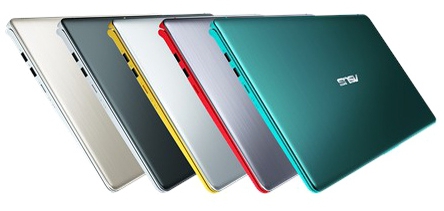
One of the first things this VivoBook does well is visual identity. The reviewed version uses a green finish that stands out clearly, while the slim display borders and clean lid design keep the laptop modern rather than flashy. ASUS also offered several other color versions for buyers who wanted a more restrained look.
The chassis uses plastic and aluminum alloy, with a metal lid that resists twisting better than an all-plastic budget design. The base is described as reasonably sturdy, with no notable creaks or large construction gaps. At 1.4 kg and 18 mm thick, the laptop remains easy to carry for commuting, study, or short business trips.
The ErgoLift hinge is another practical feature. When the lid opens, the keyboard rises slightly, which improves the typing angle and also helps airflow under the base.
Display and Audio
The 14-inch IPS panel offers a Full HD resolution and matte finish, which makes it a sensible choice for office work, web browsing, spreadsheets, and video playback. IPS viewing angles also help when more than one person is looking at the screen. ASUS Eye Care support is mentioned as a way to reduce blue light during long sessions.
The limitation is brightness. Based on the source review, the screen is more comfortable indoors than under strong outdoor light. That makes it suitable for home, classroom, and office use, but less ideal for frequent work in sunny conditions.
Audio quality is a positive point for casual use. The stereo speakers with SonicMaster tuning are described as loud and fairly detailed, though users who care more about balance and depth will still prefer headphones or external speakers. The HD webcam is adequate for video calls, but image quality is not a highlight.
Keyboard and Touchpad
The island-style keyboard is built for everyday typing rather than gaming or premium tactile feel. Keys have a short 1.4 mm travel, clear labels, and a slightly springy response that should suit long writing sessions. The layout is mostly standard, although the small arrow key block may take some adjustment.
The source also notes one ergonomic detail worth remembering: the power button sits above Backspace, so careless typing could lead to accidental presses. Keyboard backlighting is not included in this specific configuration and was available only as an option.
The touchpad is larger than average and supports up to four-finger gestures. Its most distinctive feature is the touch-activated NumberPad built into the pad surface, which adds a convenient numeric input area without increasing the chassis size. A fingerprint reader was optional rather than standard.
Performance and Connectivity
The Core i5-8265U is a quad-core Whiskey Lake processor designed for mainstream thin-and-light laptops. In this system, it is paired with 6 GB of DDR4 memory and a 256 GB SSD, which is enough for typical daily work such as browsers with many tabs, office applications, media use, and general multitasking. The SSD also helps the laptop feel responsive during startup and application loading.
Graphics are handled by Intel UHD Graphics 620, so expectations should stay realistic. The laptop is not built for demanding games or heavy graphics workloads, but it can handle video playback, everyday visual tasks, and light gaming at a basic level.
Connectivity is adequate rather than generous. You get USB Type-C, USB 3.1, two USB 2.0 ports, HDMI, a microSD card reader, and a combo audio jack. There is no RJ-45 Ethernet port, so wired networking is not part of the package. Wireless support includes Wi-Fi 802.11ac and Bluetooth 4.2.
Battery
The 3-cell 3650 mAh battery is one of the weaker points of this model. The source review estimates roughly 3 to 4 hours of web browsing, which is enough for short mobile sessions but not ideal for a full day away from a charger. Buyers who travel often or spend long hours in meetings should treat endurance as a compromise.
Charging is more encouraging: the battery can reach 60% in about 49 minutes, which helps offset the modest runtime during short breaks.
Verdict
The ASUS VivoBook S430FA is a practical everyday laptop with more visual character than many mainstream rivals. It offers a solid mix of portability, typing comfort, fast SSD storage, and enough processor performance for office work, study, and general home use. The integrated NumberPad and ErgoLift hinge also give it a few useful points of difference.
At the same time, this is not a machine for buyers who need long battery life, strong outdoor display performance, or meaningful graphics power. For users who mostly work indoors and want a light 14-inch notebook with a distinctive design and sensible everyday hardware, the VivoBook S430FA remains an appealing configuration.